Export Excel Based on Template
Introduction
The original export method is suitable for relatively simple exports where each data record corresponds to one row, and data columns have a high degree of customization. However, it couldn't handle cases where one data record corresponds to multiple rows. Therefore, template-based export was introduced in version 1.8.0.
Usage Example
Example Template
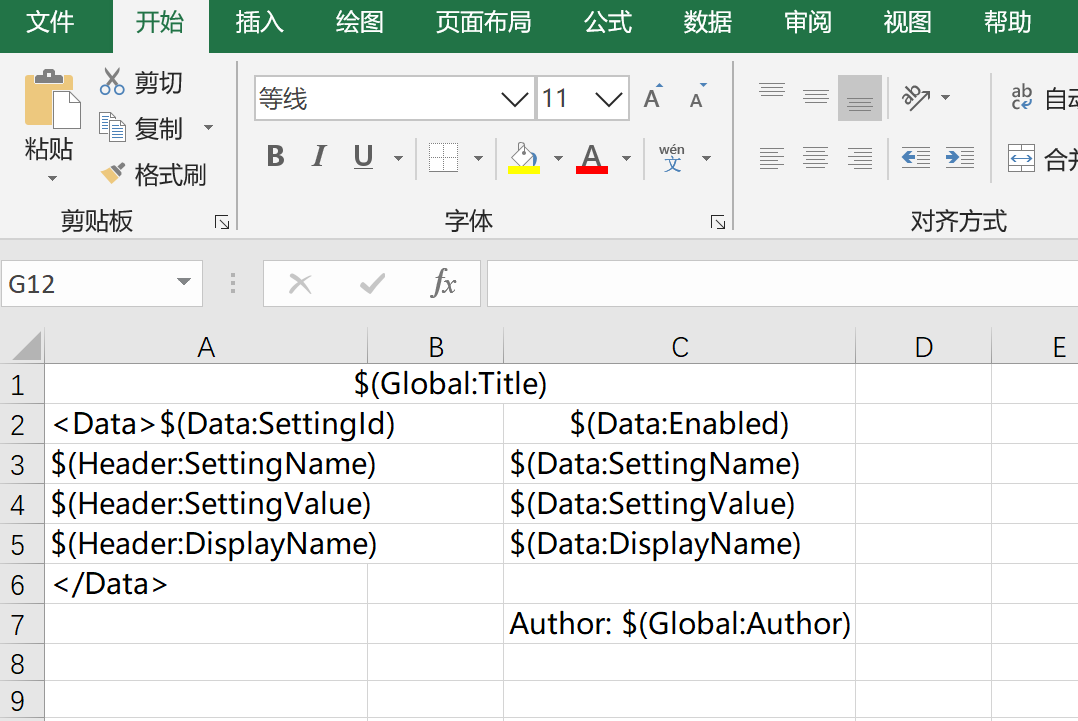
The template can have three types of data:
- Global: Parameters that can be specified during export as global parameters. Default format:
$(Global:PropName) - Header: Display names for configured properties. Default is the property name. Default format:
$(Header:PropName) - Data: Property values of the corresponding data. Default format:
$(Data:PropName)
Default template parameter format (customizable through TemplateHelper.ConfigureTemplateOptions method since version 1.8.2):
- Global parameter:
$(Global:{0}) - Header parameter:
$(Header:{0}) - Data parameter:
$(Data:{0}) - Data Begin:
<Data> - Data End:
</Data>
Template specifications:
The template needs to use Data Begin and Data End to configure the start and end of the data template to identify the start and end rows for each data record.
Example Code
Example configuration:
var setting = FluentSettings.For<TestEntity>();
// ExcelSetting
setting.HasAuthor("WeihanLi")
    .HasTitle("WeihanLi.Npoi test")
    .HasDescription("WeihanLi.Npoi test")
    .HasSubject("WeihanLi.Npoi test");

setting.HasSheetConfiguration(0, "SystemSettingsList", 1, true);

setting.Property(_ => _.SettingId)
    .HasColumnIndex(0);

setting.Property(_ => _.SettingName)
    .HasColumnTitle("SettingName")
    .HasColumnIndex(1);

setting.Property(_ => _.DisplayName)
    .HasOutputFormatter((entity, displayName) => $"AAA_{entity.SettingName}_{displayName}")
    .HasInputFormatter((entity, originVal) => originVal.Split(new[] { '_' })[2])
    .HasColumnTitle("DisplayName")
    .HasColumnIndex(2);

setting.Property(_ => _.SettingValue)
    .HasColumnTitle("SettingValue")
    .HasColumnIndex(3);

setting.Property(x => x.Enabled)
    .HasColumnInputFormatter(val => "Enabled".Equals(val))
    .HasColumnOutputFormatter(v => v ? "Enabled" : "Disabled");

setting.Property("HiddenProp")
    .HasOutputFormatter((entity, val) => $"HiddenProp_{entity.PKID}");

setting.Property(_ => _.PKID).Ignored();
setting.Property(_ => _.UpdatedBy).Ignored();
setting.Property(_ => _.UpdatedTime).Ignored();
Template-based export example code:
var entities = new List<TestEntity>()
{
    new TestEntity()
    {
        PKID = 1,
        SettingId = Guid.NewGuid(),
        SettingName = "Setting1",
        SettingValue = "Value1",
        DisplayName = "ddd1"
    },
    new TestEntity()
    {
        PKID=2,
        SettingId = Guid.NewGuid(),
        SettingName = "Setting2",
        SettingValue = "Value2",
        Enabled = true
    },
};
var csvFilePath = $@"{tempDirPath}\test.csv";
entities.ToExcelFileByTemplate(
    Path.Combine(ApplicationHelper.AppRoot, "Templates", "testTemplate.xlsx"),
    ApplicationHelper.MapPath("templateTestEntities.xlsx"),
    extraData: new
    {
        Author = "WeihanLi",
        Title = "Export Result"
    }
);
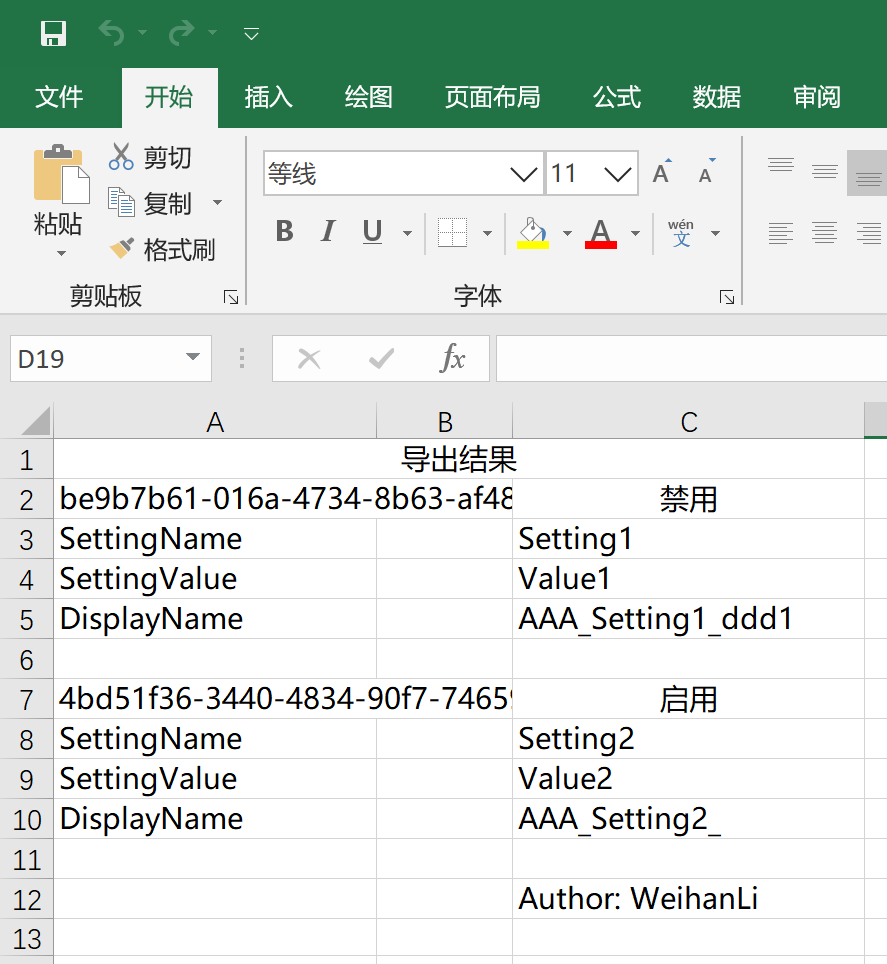
Export Result
More
For convenience, several extension methods have been added:
public static int ToExcelFileByTemplate<TEntity>([NotNull]this IEnumerable<TEntity> entities, string templatePath, string excelPath, int sheetIndex = 0, object extraData = null);

public static int ToExcelFileByTemplate<TEntity>([NotNull]this IEnumerable<TEntity> entities, byte[] templateBytes, string excelPath, ExcelFormat excelFormat = ExcelFormat.Xls, int sheetIndex = 0, object extraData = null);

public static int ToExcelFileByTemplate<TEntity>([NotNull]this IEnumerable<TEntity> entities, IWorkbook templateWorkbook, string excelPath, int sheetIndex = 0, object extraData = null);

public static byte[] ToExcelBytesByTemplate<TEntity>([NotNull]this IEnumerable<TEntity> entities, string templatePath, int sheetIndex = 0, object extraData = null);

public static byte[] ToExcelBytesByTemplate<TEntity>([NotNull]this IEnumerable<TEntity> entities, byte[] templateBytes, ExcelFormat excelFormat = ExcelFormat.Xls, int sheetIndex = 0, object extraData = null);

public static byte[] ToExcelBytesByTemplate<TEntity>([NotNull]this IEnumerable<TEntity> entities, Stream templateStream, ExcelFormat excelFormat = ExcelFormat.Xls, int sheetIndex = 0, object extraData = null);

public static byte[] ToExcelBytesByTemplate<TEntity>([NotNull]this IEnumerable<TEntity> entities, IWorkbook templateWorkbook, int sheetIndex = 0, object extraData = null);

public static byte[] ToExcelBytesByTemplate<TEntity>([NotNull]this IEnumerable<TEntity> entities, ISheet templateSheet, object extraData = null);